MailCamp Visitor Intelligence
Dutch email-marketing platform, around 1,200 customers.
Situation
MailCamp's website had steady B2B traffic: the dashboard showed sessions, bounce rates, pages per visit. What it did not show was who. Every company weighing a switch, every existing customer scoping an upgrade, came and went as an anonymous number.
Challenge
A visit count is not a lead. Knowing that fifty companies looked at the site this week tells you nothing about which of them are actually close to a decision, and blasting outreach at all of them would read exactly like the anonymous dashboard it was meant to replace.
The Play
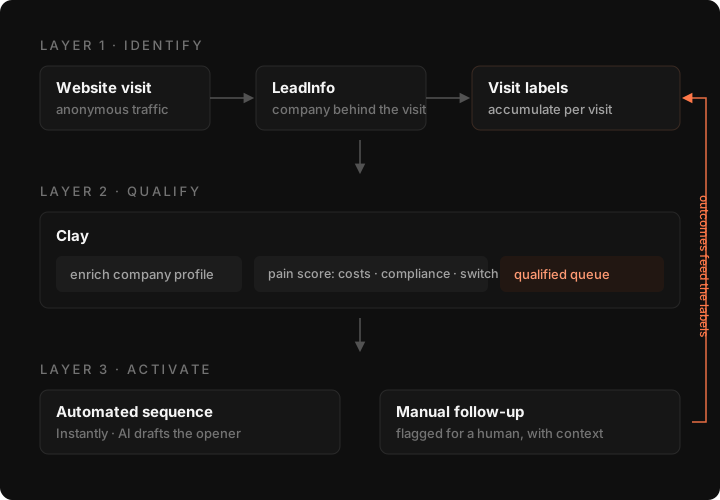
Build a three-layer pipeline: LeadInfo resolves each visit to a company name, Clay scores that company on the pages it actually looked at, and a score threshold gates who moves on to contact-finding and an AI-assisted Instantly follow-up.
Workflow
MailCamp came to me with a dashboard problem that looked like a data problem. The website had steady B2B traffic: sessions, bounce rate, pages per visit, all present and correct. But every one of those numbers was anonymous. A prospect comparing pricing, an existing customer scoping an upgrade, a compliance officer reading the DPA page: all of them showed up as the same faceless line in the analytics.
I started at the entry point, with LeadInfo. It sits in front of every visit and resolves the session to a company name before anything else happens. That gave us a fact we didn't have before: which company was on the site. But a company name on its own is not a lead. Ranking that name against the dozens of others that visited the same week needed a second layer.
That is where Clay came in. I built the scoring logic to read the pages a company actually looked at, pricing, compliance content, migration guides, and to add a label for each. The part that mattered most was making those labels stack across visits instead of resetting every time someone came back. A company that visits once and bounces looks nothing like one that returns three times to the same migration guide. Three visits is a pattern worth acting on. One usually isn't.
Past that threshold, the pipeline hands off to a contact-finding step that looks up the right person at the company, not just any inbox on the domain, and routes the result into Instantly for follow-up. The last stretch runs two AI passes back to back: the first reads the visit context (which pages, how many times, over what stretch of days) and turns it into a plain brief; the second drafts the opener from that brief, so the message references what the company was actually looking at instead of a generic "saw you on our site."
The build order turned out to matter as much as any single layer. Each one only earns its keep because of the one before it: LeadInfo's identification is what makes Clay's scoring possible, and Clay's scoring is what makes the contact-finding step worth running at all, instead of chasing every domain that loaded the pricing page once and left.
Where it landed: MailCamp's visitor traffic now lands in a scored queue instead of a bounce-rate column. A return visit adds to a company's pattern rather than resetting the counter, and the follow-up that reaches an inbox references the actual pages someone looked at, not a guess.
Highlights
Visits stack into a pattern
Return visits add labels instead of resetting the counter, so a company that comes back three times reads nothing like a one-time bounce.
A threshold before the outreach
Scoring gates the pipeline before contact-finding runs, so only visits that look like real intent reach an inbox.
Two AI passes, one job each
One pass reads the visit context, the second drafts the opener from it, so the message references what the company actually looked at.